
Document Security (DLS)
CleaveDB combines automatic tenant isolation with document and field-level policies. Access rules are evaluated in the query interpreter before results are returned to a client.
Two security layers
Tenant isolation separates each user’s documents, bonds, and policies. Security policies further control which actions or fields are available within that tenant. Tenant isolation applies even to a developer superuser operating in another user’s session.
Automatic tenant isolation
Documents are namespaced with the authenticated user’s tenant ID. Reads are filtered at the engine level on every scan, so an ordinary query only returns data belonging to the current tenant.
# David writes a document
POUR INTO products "laptop" {"price": 999}
# Stored with David's tenant namespace: products:david.laptop

# John runs the same bucket scan
FIND products
# John's result does not include David's document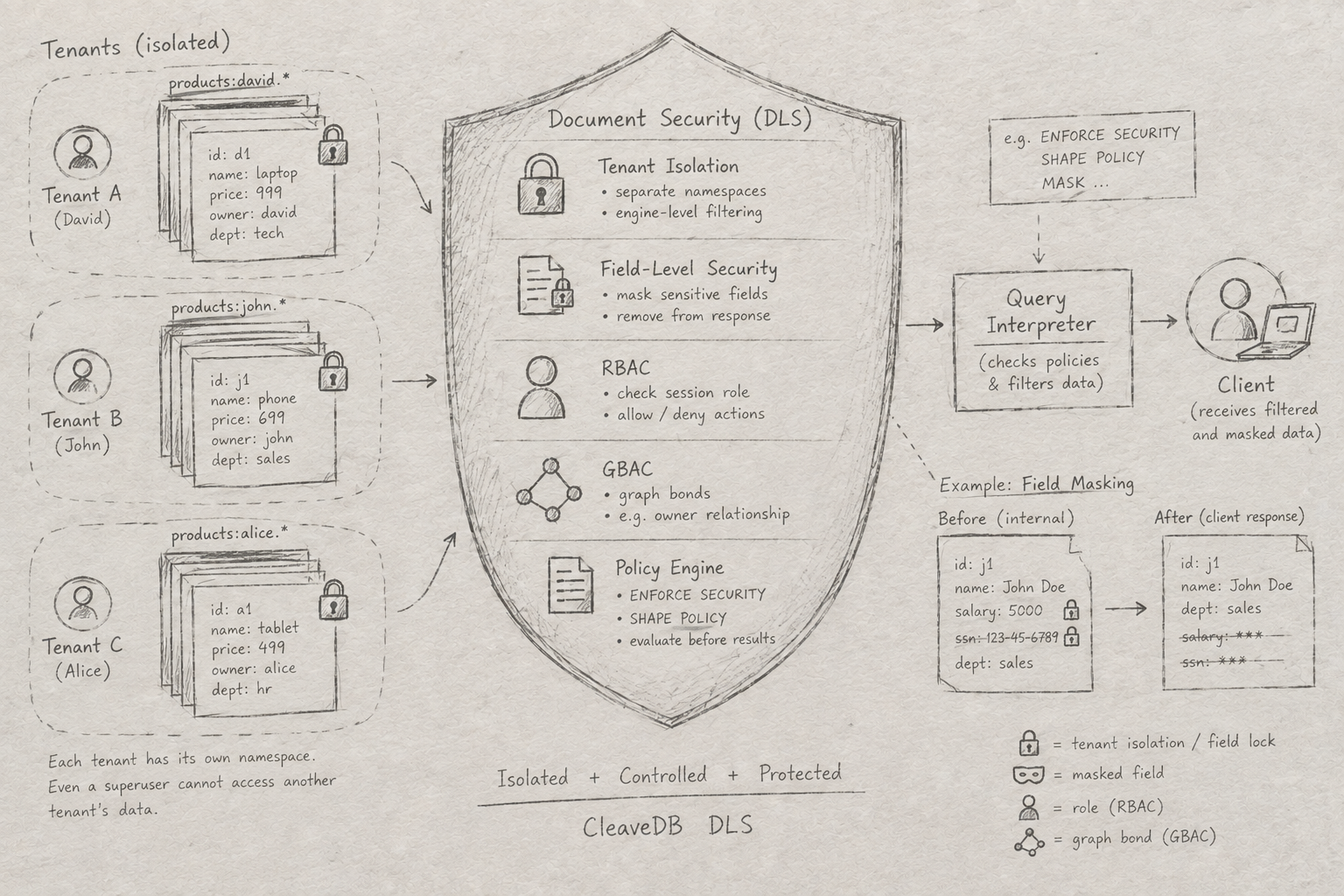
Policy controls
Use ENFORCE SECURITY for action authorization and SHAPE POLICY for read filtering. Conditions can refer to the current user, role, document fields, or graph bonds.
Role-based (RBAC)
Graph-based (GBAC)
Field and context rules
-- Allow reads when the requester is bonded as the owner
ENFORCE SECURITY "owner_only" ON "documents"
TO ALLOW read IF bonded as "owner" to my user_id

-- Restrict report writes to admins
ENFORCE SECURITY "role_gate" ON "reports"
TO ALLOW write IF my role = "admin"

-- Only expose employees in the user's department
SHAPE POLICY "dept_filter" ON "employees"
FOR READ USING department IS @user_department
Dynamic field masking
Mask sensitive fields conditionally based on the session. Masked fields are removed from the JSON response rather than merely hidden in the UI, so they are not sent over the wire to the client.
Server-side effect: clients receive no value for a field that was removed by masking. Do not rely on client-side presentation logic as the protection boundary.
-- Hide salary from users who are not admins
MASK "salary" ON "employees" IF my role IS NOT "admin"

-- Hide patient SSNs from users who are not doctors
MASK "ssn" ON "patients" IF my role IS NOT "doctor"

-- Context-based mask
SHAPE MASK email ON users USING role IS NOT @role
Session context and policy lifecycle
Policies can compare conditions against session values. Set the relevant user or role context for the session, and authenticate as the intended account before running protected queries.
SET user = "alice"
SET role = "admin"
AUTHENTICATE AS "bob"
Remove a policy when it is no longer needed with DROP SECURITY:
DROP SECURITY "owner_only" ON "documents"
DROP SECURITY "salary" ON "employees"| Condition pattern | Example | What it checks |
|---|---|---|
| RBAC | IF my role = "admin" | Session role against a literal |
| GBAC | IF bonded as "owner" to my user_id | A graph bond between document and session user |
| Field match | department IS @user_department | A document field against session context |
| Context match | @role != "viewer" | A context value against a literal |